Save individual TikTok images
Preview each slide and save the pictures you want. The tool adds no watermark and keeps the resolution supplied by TikTok.
Save TikTok photos without an added watermark. Download available source images individually or as ZIP. Text already in an image stays in place.
Try a photo post
The tool saves the available source image and adds no logo or overlay. It does not erase text, signatures, or watermarks already embedded by the creator.
A TikTok photo post contains a set of images you can swipe through. Preview and download a single picture or keep the complete carousel in its original order.
Preview each slide and save the pictures you want. The tool adds no watermark and keeps the resolution supplied by TikTok.
Download all photos in one ZIP. Numbered filenames keep every image in the slideshow’s original order.
Download available slideshow audio separately as MP3. Use the tool in your phone, tablet, or computer browser.
From a TikTok post to your photo library. Follow these three steps on mobile or desktop.
Open a public photo post or slideshow in TikTok. Tap Share, then Copy link. Full post links and TikTok share links are supported.
On desktop, you can also copy the post’s URL from your browser’s address bar.
Paste your link into the field above and select Download photos. The images appear here in the same order as the original slideshow.
tiktok.com/@creator/photo/…vm.tiktok.com/… · vt.tiktok.com/…tiktok.com/t/…
Download an individual image, save the complete photo set as a ZIP, or download the available audio as MP3.
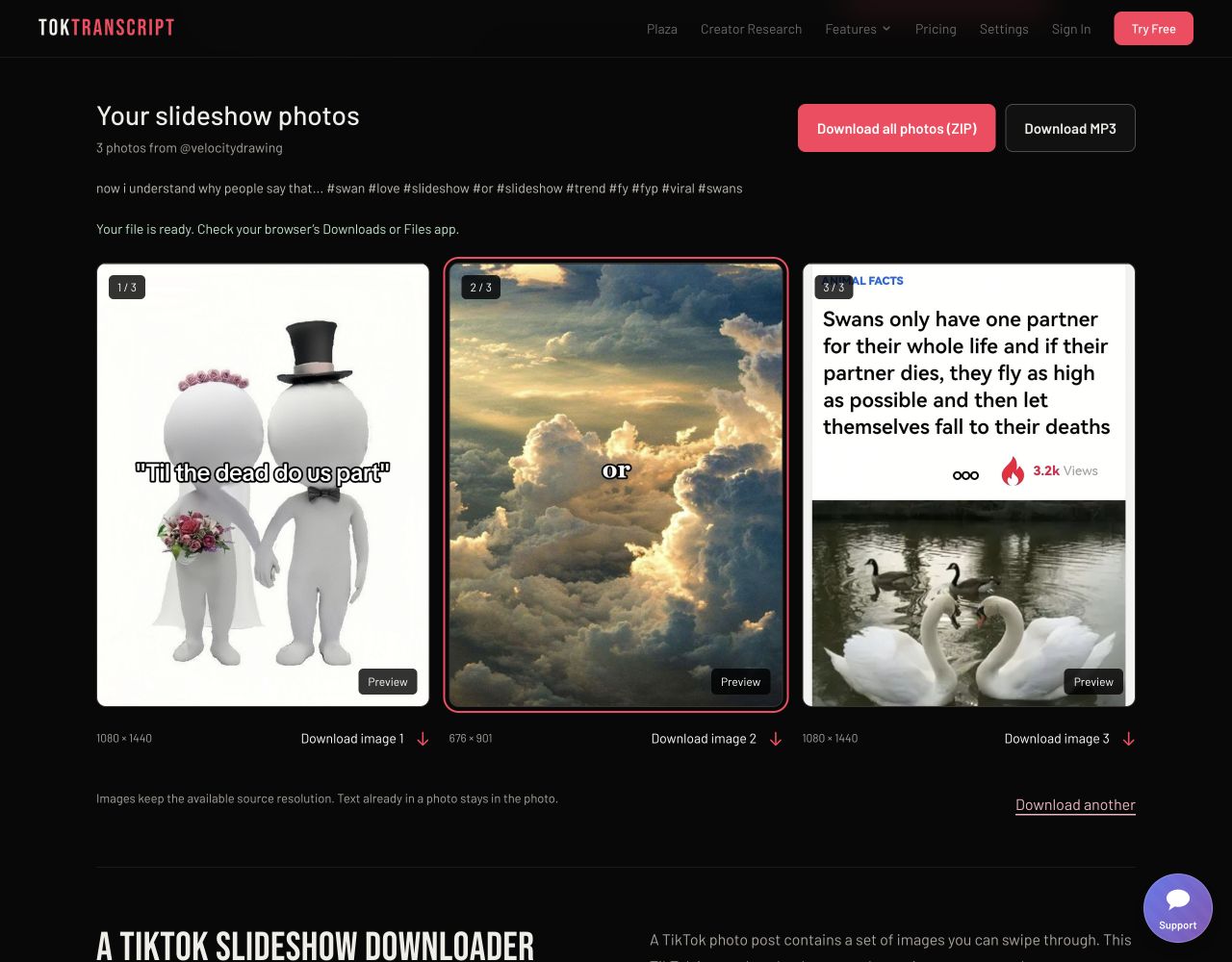
Saving to your phone? Find the file in your browser’s Downloads or Files app. On iPhone or iPad, open the image and choose Share → Save Image to add it to Photos.
Six ways to use a TikTok photo downloader. These are example workflows, not customer testimonials.
Save the photo you want to reference without taking screenshots of the entire carousel. Preview each image before choosing it.
Individual image downloadsArchive your own published photo posts as a single ZIP. Numbered files make it easier to share the full set with your team.
All photos in one ZIPCollect permitted image references for layouts, colors, and composition. Save the available source image without adding a new watermark.
Available source resolutionKeep an accessible photo tutorial for later study. Downloading the whole set preserves the slide order, so each step stays in sequence.
Slides stay in orderCopy a post’s link in TikTok and open this page in your phone’s browser. Download a picture to Files, then add it to your photo library.
Works in a mobile browserKeep the images from your slideshow and download its available soundtrack separately. The MP3 option appears when the post provides accessible audio.
Separate photos and MP3Share your experience with TokTranscript and help others decide.
Sample testimonials for illustration. Names, locations, and star ratings are fictional.
Exactly what I needed for saving my photo posts. I pasted the link, saw every slide, and downloaded the whole set in one ZIP. So much easier than taking screenshots one by one.
Super easy to use! I like being able to preview the pictures and choose just the ones I want. The files look clear, and I didn’t have to create an account.
I was looking for a TikTok slideshow downloader that actually saves the pictures separately. This does exactly that. Having a download button under each photo makes it really straightforward.
As a creator, keeping a backup of my carousels matters. The ZIP keeps my slides in order, and being able to save the available audio separately is a useful extra.
ใช้งานง่ายมาก แค่คัดลอกลิงก์มาวางก็เห็นรูปทั้งหมดในโพสต์ เลือกดาวน์โหลดทีละรูปหรือเก็บทั้งชุดเป็น ZIP ก็ได้ สะดวกกว่าการแคปหน้าจอทีละรูปเยอะเลย
Praktis banget! Tinggal salin tautan, tempel, lalu pilih foto yang mau disimpan. Bisa dipakai langsung di browser HP tanpa instal aplikasi. Download satu album jadi lebih mudah.
The tool saves the available source image and adds no logo or overlay. It does not erase text, signatures, or watermarks already embedded by the creator.
Copy the link to a public TikTok photo post, paste it above, and select Download photos. Save the pictures individually or together as a ZIP. The tool retrieves the available source images and adds no watermark; text or logos already inside a picture remain.
Yes. Photo downloads are free and do not require a TokTranscript account, subscription, or software installation. Temporary request limits keep the service available for everyone.
Yes. When the public post is accessible, all available slides are listed in their original order. Download all photos as a ZIP to keep the entire set together.
Images retain the resolution provided by TikTok. They are downloaded without resizing or recompression. Quality depends on the uploaded source, so every photo is not necessarily HD.
Yes. Open this page in your mobile browser and use the image download buttons. Files usually appear in your browser Downloads or Files app. On iPhone or iPad, open a downloaded image and use Share, then Save Image, to add it to Photos.
If TikTok provides an accessible audio track, a Download MP3 button appears with the photos. The track is downloaded separately; its duration may differ from the part used in the post.
Use a full tiktok.com/@creator/photo/123… link or a TikTok share link from vm.tiktok.com, vt.tiktok.com, or tiktok.com/t/. A video-style link also works when it identifies a photo post.
The post may be private, deleted, restricted in the server’s region, or temporarily blocked by TikTok. Check the copied link and try again. A regular video cannot be processed as a photo post. If an earlier result has expired, load the photos again.
This tool saves the photos and available audio separately. The Download all photos button creates a ZIP archive containing the pictures in order.